About Me

Anjum Ara I am a technology enthusiast, an ardent reader. My latest interest is virtualization. In my free time, I love understanding child nutrition, child holistic development. I bake, read, paint, and do whatever it takes to improve myself every day.

Wednesday, August 3, 2022

Unable to use KSS for Demo Key Stores, KSS is unavailable.


Error: 

Caused By: weblogic.management.provider.internal.RuntimeAccessImpl$ParseException: [Management:141266]Parsing failure in config.xml: java.lang.IllegalArgumentException: Unable to use KSS for Demo Key Stores, KSS is unavailable.

If you continue to get KSS error, go to config.xml and set it to "false"

Symptoms:

Unable to start the services hosted on any server other than the Foundation/Weblogic server. 

Managed server logs are not created

If you disable KSS parameter in the config.xml it will get replaced to true every time you attempt to start the service


Solution: 

1. Copy the setstartupenv.sh from D:\Oracle\Middleware\user_projects\domains\Epmsystem\bin of the Admin Server to the distributed server on the same location 

2. Start the service


For Windows refer to my previous post : Starting managed servers on a new distributed environment EPM 11.2.X


Share:

Tuesday, July 5, 2022

EPM 11.2.8 OHS Nodemanager password update

Applicable if  storeUserConfig was used to save user information.

Situation: Reconfiguration of the environment was done and the password of epm_admin was changed while starting OHS services. You get the below error:


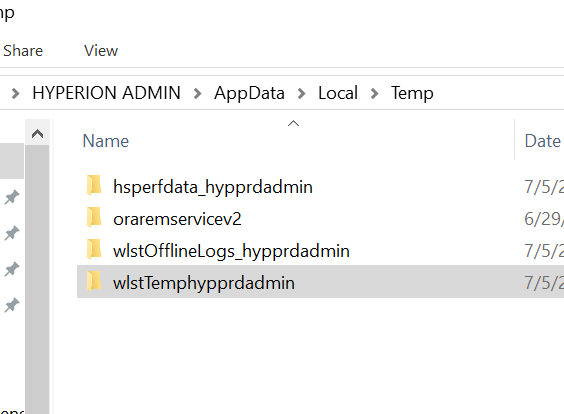
The password is not stored in the exact location as shown in the error. 


Delete the files in the location : C:\Users\<username>AppData\Local\Temp


Start the Oracle HTTP Service again following the below link:

http://learninghyperion.blogspot.com/2021/05/starting-ohs-with-stored-nodemanager.html  

Share:

Monday, July 4, 2022

Starting EPM 11.2.8 services on distributed Linux environment

 After installing services on distributed environment, the Java Web Services on distributed servers do NOT start.


Error: java.lang.UnsatisfiedLinkError: no environmentjni in java.library.path


Solution: Copy the /domain/EPMSystem/bin/setstartupEnv.sh script from the Foundation server to the distributed servers

Start the services. 


OR 


1. Add the below variables to the setStartupEnv.sh file


export

JAVA_OPTIONS="-Dhyperion.home=/u01/Oracle/Middleware/EPMSystem11R1 -DHYPERION_HOME=/u01/Oracle/Middleware/EPMSystem11R1 -DEPM_ORACLE_HOME=/u01/Oracle/Middleware/EPMSystem11R1 -DEPM_ORACLE_INSTANCE=/u01/Oracle/Middleware/user_projects/epmsystem1 -Dlogging.folder=/u01/Oracle/Middleware/user_projects/domains/EPMSystem/servers/EssbaseAdminServices0/logs/ -Dserver.name=EssbaseAdminServices0 -Dsun.net.inetaddr.ttl=0 -Djava.io.tmpdir=/u01/Oracle/Middleware/user_projects/epmsystem1/tmp -Doracle.jdbc.useFetchSizeWithLongColumn=true -Doracle.security.jps.config=/u01/Oracle/Middleware/user_projects/domains/EPMSystem\config\fmwconfig\jps-config.xml -Dcommon.components.home=/u01/Oracle/Middleware\oracle_common -Dweblogic.alternateTypesDirectory=/u01/Oracle/Middleware\Oracle_common\modules -Djrf.version=12.2.1.3.0 -Doracle.domain.config.dir=/u01/Oracle/Middleware/user_projects/domains/EPMSystem\config\fmwconfig -Djava.system.class.loader=com.oracle.classloader.weblogic.LaunchClassLoader -d64 -Djava.security.egd=file:/dev/../dev/urandom -DcomponentId=a30d97cf1ea22fc0S1d5b5b21180fbe47665S7a55 -Djava.library.path=/u01/Oracle/Middleware/EPMSystem11R1/lib:/u01/Oracle/Middleware/EPMSystem11R1/products/Essbase/eas/server/bin:/u01/Oracle/Middleware/EPMSystem11R1/common/EssbaseRTC-64/11.1.2.0/bin: -DPATH=/u01/Oracle/Middleware/EPMSystem11R1/lib:/u01/Oracle/Middleware/EPMSystem11R1/products/Essbase/eas/server/bin:/u01/Oracle/Middleware/EPMSystem11R1/common/EssbaseRTC-64/11.1.2.0/bin: -DEAS_HOME=/u01/Oracle/Middleware/EPMSystem11R1/products/Essbase/eas -DESS_ES_HOME=/u01/Oracle/Middleware/EPMSystem11R1/products/Essbase/eas/server  ${JAVA_OPTIONS}"


export

LD_LIBRARY_PATH="/u01/Oracle/Middleware/EPMSystem11R1/lib:/u01/Oracle/Middleware/EPMSystem11R1/products/Essbase/eas/server/bin:/u01/Oracle/Middleware/EPMSystem11R1/common/EssbaseRTC-64/11.1.2.0/bin::${LD_LIBRARY_PATH}"


export

PATH=/u01/Oracle/Middleware/EPMSystem11R1/lib:/u01/Oracle/Middleware/EPMSystem11R1/products/Essbase/eas/server/bin:/u01/Oracle/Middleware/EPMSystem11R1/common/EssbaseRTC64/11.1.2.0/bin:$PATH


ESSBASEPATH="/u01/Oracle/Middleware/EPMSystem11R1/common/EssbaseRTC-64/11.1.2.0"

export ESSBASEPATH


ARBORPATH="/u01/Oracle/Middleware/EPMSystem11R1/common/EssbaseRTC-64/11.1.2.0"

export ARBORPATH


Then start the managed service like EAS , APS on other node. 

Share:

Tuesday, September 14, 2021

EPRCS Series: Tips & Tricks: Does your doclet generate overlapped preview?

 Working on Narrative Reporting Tool with word format can be tricky. Does your preview overlap and look like this?


It is merging two doclets due to incorrect formatting. Let us fix this:

1. Open the doclet > Check Out

2. Simple trick is to insert a textbox to easily move the content around the doclet.

3. Format the textbox as shown below to make it invisible and appear as a part of the doclet


4. Layout for the textbox:


5. Embed the content/table/referenced ranges inside the textbox
6. Check-in
7. Preview the report again:


Share:

Tuesday, September 7, 2021

EPRCS Series : Uploading Additional Fonts

 Oracle recommends uploading any custom fonts or additional fonts to the EPRCS cloud instance to generate a pixel-perfect 'preview'. 

On the reference doclet click on "Valdiate Fonts" and view the warning.


Only .ttf are supported. You can upload as follows

1. Go to Library > Fonts

2. You can create a separate folder to organize it

3. Select the TTF file or zip file and upload.

If there are any duplicates it will warn and import the rest of the fonts. 


Share: